databasedev.co.uk - database solutions and downloads for microsoft access
Microsoft Access Articles
- General Microsoft Access Articles
- Microsoft Access 2007 Articles
- Tables
- Queries
- SQL
- Forms
- Reports
- Macros
- Modules & VBA
- Data Models
- Downloads
GUI Design
Resources
Online Shop
Info
Microsoft Access Forms Before Update Event
Requiring Data Entry into Microsoft Access Form Fields:
If you want to stop users from saving records with missing information, make the fields required in the table definition. If you don't want to do that, you need to put your edit code in the form's BeforeUpdate event. That way you can cancel the saving or adding of a record with missing info.
Using the following, paste this into a code module:
Public Function RequiredData(ByVal TheForm As Form) As Boolean

'Check that all TextBox controls have required data entered

    Dim Ctl As Control
    Dim Num As Integer

    On Error GoTo Err_RequiredData

    RequiredData = False
    Num = 0
    For Each Ctl In TheForm
        If Ctl.ControlType = acTextBox Then
            If Ctl = "" Or IsNull(Ctl) Then
                Num = 1
                Exit For
            End If
        End If
    Next Ctl
    If Num = 1 Then
        MsgBox "Data is required in " & Ctl.Name & "," & vbCr & _
        "please ensure this is entered.", _
        vbInformation, "Required Data..."
        RequiredData = True
    Else
        RequiredData = False
    End If

Exit_RequiredData:

    On Error Resume Next
        If Not (Ctl Is Nothing) Then
            Set Ctl = Nothing
        End If
    Exit Function

Err_RequiredData:

    Select Case Err
        Case 0
            Resume Next
        Case Else
            MsgBox "Error: " & Err.Number & vbCrLf & vbCrLf & Err.Description, _
            vbInformation
    End Select

End Function
Now to call the code, you can use the following in the Before Update event of the Form:
Private Sub Form_BeforeUpdate(Cancel As Integer)
    If RequiredData(Me) Then Cancel = -1
End Sub
Now when a user attempts to leave the form, they will be prompted to enter information into the form field specified in the error message as shown in the example below:
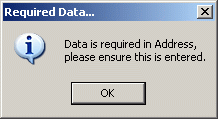
Message displayed when user tries to leave form without entering data.